Create Token
Anyone with enough Taiji currency in his/her wallet to run an application can create a new token. Currently, the fee to run an application on the blockchain is 1000000 SHELL. To get some currency, you can use Taiji Faucet to transfer you 1000 TAIJI per day on the testnet or contribute to networknt or taiji-chain projects to mine the currency on the mainnet. We pay Taiji currency for each contribution based on the workload and time consumed to encourage more contributions to build our products and the community.
Create Token
The following the Create Token form on Web Client.
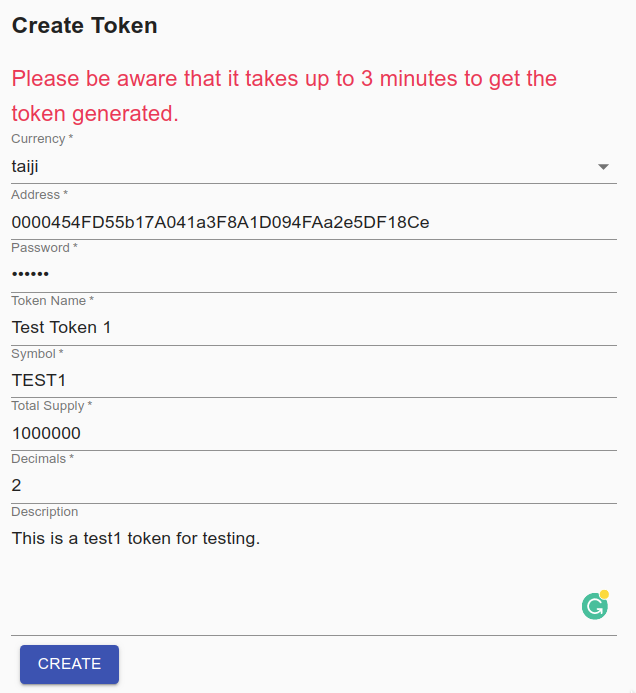
The light blockchain supports multiple currencies, although only Taiji is available at the moment. Any token must associate with one of the currencies. You can see the “taiji” currency is selected in the above form.
Also, a token must be associated with a wallet or an address. This address is the owner of the token created. The address must have at least 1000000 SHELL to pay the fee to create the token.
The password is to used to open the wallet for the above address.
The name of the token is a free text string and it should be something that can be easily remembered.
The symbol is very important, and it is the key to access the token along with the token address. The symbol is much better to remember during the token transactions than the token address. It is just like a stock symbol in the market. Normally, it should be one capitalized word about 4 to 5 characters.
The total supply is the number of tokens you want to create. Based on your usage, you can create dozens to billions of tokens.
Many token contracts support fractional tokens, and they do so in precisely the same way by having a scaling factor. In ERC20 tokens, the scaling factor is denoted by decimals, which indicates how many 0’s there are to the right of the decimal point the fixed-point representation of a token. For instance, a contract that supports 1⁄100’s of tokens (e.g, 3.14, 2.72) would have decimals equal to 2. If decimals = 2, then the value stored to represent 3.14 would be 314. If you don’t understand how to use it, just use zero in this field.
A description indicates the purpose and usage of the token.
Once you click the CREATE button, it will take a while to get the token created. The token address will be in the same bank. It means the first four digits of the token address will be the same as the owner’s address.
Here is the response of create token.
{
  "tokenAddress": "00009c715c281D3A844B2239D42096556E2C210e",
  "transaction": {
    "currency": "taiji",
    "d": [
      {
        "0000454FD55b17A041a3F8A1D094FAa2e5DF18Ce": {
          "id": 0,
          "time": 0,
          "toAddress": "000085f904e427a2721738930681ca7AA2E7984B",
          "value": 1000000,
          "data": ""
        }
      }
    ],
    "c": [
      {
        "00009c715c281D3A844B2239D42096556E2C210e": {
          "id": 0,
          "time": 0,
          "toAddress": "00009c715c281D3A844B2239D42096556E2C210e",
          "value": 0,
          "data": "AAAAAAFQMDAwMDQ1NEZENTViMTdBMDQxYTNGOEExRDA5NEZBYTJlNURGMThDZQQACnRhaWppUDAwMDA5YzcxNWMyODFEM0E4NDRCMjIzOUQ0MjA5NjU1NkUyQzIxMGUKVEVTVDGAiXoAgAF7Im5hbWUiOiJUZXN0IFRva2VuIDEiLCJkZXNjcmlwdGlvbiI6IlRoaXMgaXMgdGhlIGZpcnN0IHRva2VuLiJ9AAAA"
        }
      },
      {
        "000085f904e427a2721738930681ca7AA2E7984B": {
          "id": 0,
          "time": 0,
          "toAddress": "000085f904e427a2721738930681ca7AA2E7984B",
          "value": 1000000,
          "data": ""
        }
      }
    ]
  },
  "status": "sent"
}
Token Info
With the token address 00009c715c281D3A844B2239D42096556E2C210e to query the token info. Here is the result.
{
  "EventId": {
    "address": "0000454FD55b17A041a3F8A1D094FAa2e5DF18Ce",
    "nonce": 2,
    "derived": false
  },
  "currency": "taiji",
  "entityAddress": "00009c715c281D3A844B2239D42096556E2C210e",
  "symbol": "TEST1",
  "totalSupply": 1000000,
  "decimals": 0,
  "value": "{\"name\":\"Test Token 1\",\"description\":\"This is the first token.\"}",
  "timestamp": 1601899727475,
  "offset": 4,
  "partition": 0
}
You can also use the token symbol to query the token info, and the result is the same.
Token Account
The above info is general for the token itself. As the token creator, you can access the account info of the token from the Token Account form. Enter your wallet address; the result will show all the tokens in your wallet. Optionally, you can add the token symbol in the second field to filter the result for one specific token.
In the above create token response, I am using the address 0000454FD55b17A041a3F8A1D094FAa2e5DF18Ce. Let’s query the Token Account for the address.
{
  "TEST1": {
    "approval": {
      "00009c715c281D3A844B2239D42096556E2C210e": 1000000
    }
  }
}
If you are holding multiple tokens, there are multiple entries in the response. To ensure the result only contains one symbol, add the symbol in the Token Account form.
{
  "approval": {
    "00009c715c281D3A844B2239D42096556E2C210e": 1000000
  }
}
Token Transaction
To access the token transactions for an owner address, you can use the Token Transaction query form. Enter the owner’s address and optional token symbol for the filter.
Here is the response for address 0000454FD55b17A041a3F8A1D094FAa2e5DF18Ce above.
[
  {
    "no": 2,
    "ev": "TokenCreatedEvent",
    "ty": "A",
    "sy": "TEST1",
    "to": "0000454FD55b17A041a3F8A1D094FAa2e5DF18Ce",
    "fr": "00009c715c281D3A844B2239D42096556E2C210e",
    "am": 1000000,
    "ts": 1601899727475
  }
]